Why Page Source Doesn't Show Everything (JavaScript SEO Explained)
Learn the difference between Raw HTML (View Source) and the Rendered DOM (Inspect Element). Discover how JavaScript SEO, SSR, CSR, and Google's 2-stage indexing impact search rankings.
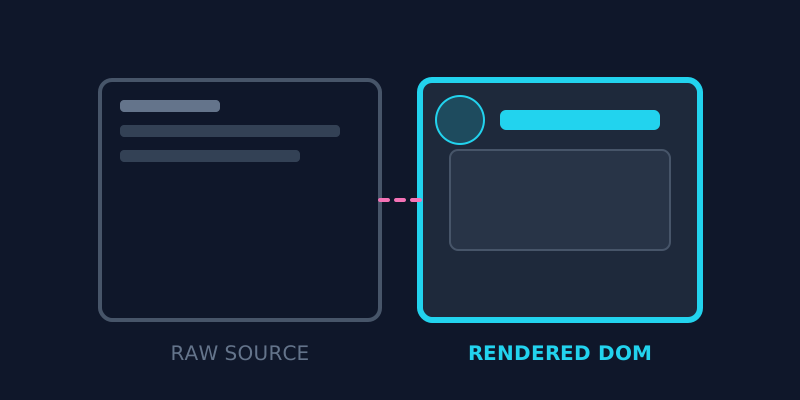
The "View Source" Surprise in Modern Web Development
Have you ever right-clicked a modern website, selected "View Page Source", and been shocked to see almost nothing on the screen except a single empty tag like <div id="root"></div> or a massive block of unreadable script files?
Where did all the text, images, navigation menus, and headings go?
For decades, digital marketers and web developers relied entirely on "View Page Source" to inspect a website. But with the rapid rise of modern JavaScript frameworks like React, Next.js, Vue, and Angular, that traditional method now has a major blind spot.
In 2026, understanding the difference between what your server sends and what your browser builds is the single most important lesson in JavaScript SEO.
The 8th-Grade Analogy: Imagine ordering a furniture set online. - Raw HTML (View Source) is receiving the flat cardboard box containing loose wood and an instruction manual. - The Rendered DOM (Inspect Element) is opening the box, following the manual, and assembling the pieces into a fully built bookshelf.
If search engine bots only get the flat cardboard box without instructions, they can't tell what your bookshelf looks like!

1. Raw HTML vs. The Rendered DOM
To master JavaScript SEO, you must understand the two distinct states of every modern webpage:
State A: Raw HTML (Server Response)
This is the raw, un-executed code delivered directly from your web server to a browser or search engine crawler. When you use an online tool like ViewPageSource or press Ctrl+U, you are inspecting this initial server broadcast.
If your website relies strictly on Client-Side Rendering (CSR), your raw HTML is usually an empty "shell" with no actual text content.
State B: Rendered DOM (Document Object Model)
This is the live, interactive webpage created after your browser downloads and executes all JavaScript scripts. When you right-click on a page and select Inspect Element (or press F12), Chrome DevTools shows you this fully rendered DOM tree.
2. How Google Indexes JavaScript Sites: The 2-Stage Indexing Queue
Many website owners assume Google views websites instantly just like human visitors do. In reality, Googlebot processes JavaScript-heavy websites through a two-stage indexing workflow:

Stage 1: The Initial HTML Pass (Instant Wave)
Googlebot crawls your URL and immediately reads the Raw HTML.
- If your page title, headings (<h1>), meta tags, canonical links, and main article text are present in this initial HTML, Google indexes your page immediately.
Stage 2: The Rendering Queue (Deferred Second Wave)
If your raw HTML is empty (because it requires JavaScript to build the page), Googlebot cannot index your content right away. Instead, it places your page into a rendering queue powered by Chrome Web Rendering Service (WRS). - Because executing JavaScript across billions of pages requires massive computer processing power, your page may sit in the rendering queue for hours, days, or even weeks before Googlebot finally renders and indexes your text!
Why this matters for your business: If you publish breaking news, time-sensitive product launches, or competitive e-commerce deals using pure client-side JavaScript, you risk losing search traffic because Googlebot delays indexing your pages.
3. Web Rendering Strategies Compared (CSR vs SSR vs SSG)
To eliminate indexing delays, modern web development offers several rendering strategies. Here is how they compare for SEO:
| Rendering Strategy | Where HTML is Built | Raw HTML Content | Googlebot Indexing Speed | Best Use Case |
|---|---|---|---|---|
| Client-Side Rendering (CSR) | User's Browser | Empty Shell (<div id="root">) | Slow (2nd Wave Queue) | Private Dashboards / SaaS Apps |
| Server-Side Rendering (SSR) | Web Server | Full HTML per Request | Instant (1st Wave) | Dynamic E-commerce & News |
| Static Site Generation (SSG) | Build Time | Full Pre-rendered HTML | Instant (1st Wave) | Blogs, Marketing Sites & ViewPageSource |
| Incremental Regeneration (ISR) | Background Server | Full Pre-rendered HTML | Instant (1st Wave) | High-volume content portals |
Frameworks like Next.js and Nuxt.js have become industry standards precisely because they utilize SSR and SSG. They deliver fully populated HTML source code the instant a request hits the server, giving you the speed of static sites with the power of modern JavaScript.
4. View Source vs Inspect Element: A Side-by-Side Comparison
Understanding when to use each browser inspection tool is essential for effective technical audits:
| Feature | View Page Source (Raw HTML) | Inspect Element (Rendered DOM) |
|---|---|---|
| What it displays | Original code sent by web server | Live document state after JavaScript execution |
| Primary Tool | ViewPageSource or Ctrl+U | Chrome DevTools (F12) |
| Search Engine Stage | What Googlebot sees in Wave 1 | What Googlebot sees in Wave 2 |
| Reveals | True HTTP status, raw <head> tags, initial server speed | Dynamic UI changes, interactive state, injected classes |
| Best For | Server SEO audits, schema validation, performance checks | UI styling, DOM debugging, network monitoring |
| Misses | Elements added dynamically via JavaScript | Initial server response headers, server redirects |
5. How to Audit Your Website's JavaScript SEO (Step-by-Step)
Follow this 4-step workflow to verify that search engines can read your website without delays:

Step 1: Inspect Your Raw Server HTML
Enter your webpage URL into ViewPageSource. Look closely at the HTML tab:
- Is your main article text visible?
- Are your <h1> and <h2> headings present in the code?
- Are your meta tags, Open Graph tags, and Schema.org structured data included?
If these elements are missing from the raw HTML, your website is heavily dependent on client-side rendering.
Step 2: Compare with Inspect Element
Open your live page in Chrome, right-click, and select Inspect. Search for your target keywords and links. If content appears in Inspect Element that is missing from View Source, note down those missing elements — Googlebot will experience indexing latency for them.
Step 3: Test with Google Search Console
Use the URL Inspection Tool in Google Search Console: 1. Enter your URL and click Test Live URL. 2. Click View Tested Page → Screenshot and HTML tab. 3. Verify that Googlebot successfully rendered your text, images, and internal navigation links.
Step 4: Audit Performance & Core Web Vitals
Excessive client-side JavaScript execution degrades Interaction to Next Paint (INP) and Total Blocking Time (TBT). Check our guide on fixing technical SEO to boost traffic and learn how to streamline script execution.
Read more about web rendering standards on Google Search Central's JavaScript SEO Basics and MDN Web Docs.
Frequently Asked Questions
Why does View Page Source look different from Inspect Element?
View Page Source shows the raw HTML document delivered directly by your web server before any scripts run. Inspect Element shows the live Rendered DOM after your browser's JavaScript engine has executed code, updated styles, and injected dynamic HTML elements into the page.
Can Google index content rendered with JavaScript?
Yes, Googlebot can execute JavaScript and index rendered content. However, it processes JavaScript in a two-stage system: raw HTML is indexed immediately in Wave 1, while JavaScript rendering is deferred to Wave 2. This delay (the rendering queue) can slow down indexation for dynamic websites.
What is the difference between CSR and SSR?
Client-Side Rendering (CSR) builds the webpage inside the user's browser using JavaScript, delivering an empty initial HTML shell. Server-Side Rendering (SSR) compiles the webpage on the web server before sending it, delivering a complete HTML document that search engines can read instantly.
How do I know if my website has a JavaScript SEO problem?
The simplest test is to open your URL in ViewPageSource. If your main page text, headings, meta tags, and internal links are missing from the raw HTML output, your website suffers from a JavaScript dependency that could cause indexation delays.
Why is Next.js better for SEO than basic React?
Basic React uses Client-Side Rendering (CSR) by default, serving an empty HTML container (<div id="root"></div>). Next.js supports Server-Side Rendering (SSR) and Static Site Generation (SSG), pre-rendering your page into full HTML on the server so search engines can index your content instantly without rendering delays.
Do other search engines like Bing and Yahoo index JavaScript?
While Googlebot has advanced rendering capabilities via Chrome Web Rendering Service, other search engines (like Bing, Yandex, DuckDuckGo, and social media crawlers like Twitter/Facebook link previews) have much more limited JavaScript rendering abilities. Serving pre-rendered HTML via SSR or SSG ensures maximum compatibility across all search bots.
Conclusion: Don't Leave Your SEO to Chance
JavaScript makes modern web applications powerful, interactive, and beautiful. But if your content only exists after JavaScript runs, you are putting your search engine visibility at risk.
Always aim for a content-first HTML source code that delivers complete text, metadata, and structured schema the moment it leaves your server.
Ready to optimize your site?
Want to see what your web server is actually sending to search bots? Run a free source code check with ViewPageSource to inspect your raw HTML, CSS, JavaScript, and meta tags instantly.
Ready to optimize your site?
Use our professional tools to analyze your source code and technical SEO health in seconds.
Start for Free →