How to Choose the Right CMS for Your Next Web Project
A deep dive into the SEO pros and cons of WordPress, Shopify, and Headless CMS architectures. Make an informed decision for 2026.
The Decision That Defines Your Digital Future
Choosing a Content Management System (CMS) is one of the most significant decisions a business owner or developer will make. It's not just about how you edit text; it defines your site's performance ceiling, your security posture, and your ultimate ranking potential in search engines.
In 2026, the gap between a "good" CMS and a "great" one has widened. Search engines now place a massive premium on technical performance (Core Web Vitals) and semantic clean code. If your CMS generates "div soup" or locks you into slow server architectures, no amount of quality content will save your rankings.
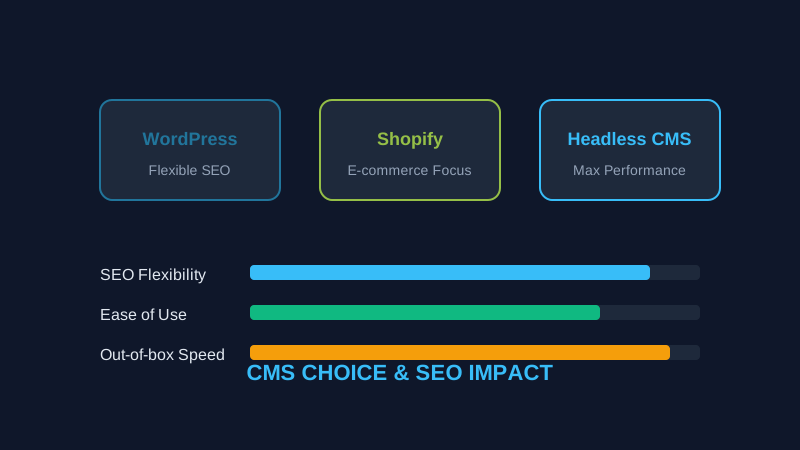
This guide compares the three dominant CMS categories: WordPress, Shopify, and Headless CMS, focusing specifically on their technical SEO implications.
1. WordPress: The SEO Champion (with a Catch)
WordPress powers over 40% of the web for a reason. Its ecosystem of SEO plugins (like Yoast or RankMath) is second to none.
The SEO Pros:
- Total Metadata Control: You can easily edit every meta tag, schema type, and canonical link.
- Topical Authority: Excellent for building complex content silos and internal linking structures.
- Community Support: If you have an SEO problem, someone has already solved it for WordPress.
The Technical Cons:
- Plugin Bloat: Every plugin you add likely injects CSS and JavaScript into your header, slowing down your site.
- Security Vulnerabilities: Being the most popular CMS makes it the biggest target for automated attacks.
- Legacy Code: Older themes can be extremely heavy, leading to poor Core Web Vitals scores out of the box.
Best for: Content-heavy blogs, news sites, and businesses wanting maximum SEO flexibility.
2. Shopify: The E-commerce Specialist
For online stores, Shopify is the industry standard. It handles the "business" of selling better than almost any other platform.
The SEO Pros:
- Built-in Schema: Product, Review, and Price schema are often handled automatically and correctly.
- Speed by Default: Shopify's global CDN is incredibly fast for assets.
- Mobile-First: Almost all modern Shopify themes pass mobile-friendliness tests with ease.
The Technical Cons:
- Locked URL Structure: You cannot easily change
/products/or/collections/in the URL, which can be frustrating for advanced SEOs. - App Dependencies: Just like WordPress plugins, Shopify apps can severely degrade your page speed.
- Limited Template Control: You are often restricted by the liquid template engine, making deep structural changes difficult without a developer.
Best for: Pure-play e-commerce businesses that want a reliable, "hands-off" technical foundation.
3. Headless CMS (Next.js, Sanity, Contentful)
This is the "modern" approach where the content (the CMS) is separated from the presentation (the frontend).
The SEO Pros:
- Absolute Performance: Because the frontend is often pre-rendered (SSG), pages can load in milliseconds.
- Clean Code Only: You have 100% control over the HTML. No "div soup," no unnecessary scripts.
- Security: There is no "admin" dashboard attached to the public site, making it much harder to hack.
The Technical Cons:
- Development Required: You can't just install a plugin for SEO. You have to build the SEO features (sitemaps, meta tags, etc.) yourself.
- Higher Cost: Usually requires specialized developers and a custom hosting setup (like Vercel or Netlify).
- Complexity: Not for beginners. Managing a headless setup requires a technical team.
Best for: Well-funded tech companies, SaaS brands, and high-performance projects where speed is the #1 priority.
How to Audit a CMS Before Committing
Don't take a salesperson's word for it. Before you choose a CMS, look at other sites built with that technology:
- Find a Showcase Site: Look at 2-3 prominent sites using the CMS you are considering.
- Run a Technical Audit: Enter their URLs into ViewPageSource and look at their:
- Check the Speed: Run the URLs through Google PageSpeed Insights.
Summary Checklist: Which one is for you?
- Choose WordPress if: You are a content creator, you have a limited budget, and you want to manage everything yourself.
- Choose Shopify if: You sell products online and want the technical complexity of payments and security handled for you.
- Choose Headless if: You are a developer or have a dev team, and you want to build the fastest, most secure site possible to out-compete everyone else on technical SEO.
Conclusion
The CMS you choose is the skeleton of your website. If the skeleton is weak, the rest of your body—your content, your ads, your brand—will suffer. Use ViewPageSource to audit your current site today. If your tech stack is holding you back, it might be time for a change.
Ready to optimize your site?
Use our professional tools to analyze your source code and technical SEO health in seconds.
Start for Free →